Build a dinosaur runner game with Deno, pt. 5

This series of blog posts will guide you through building a simple browser-based dinosaur runner game using Deno.
- Setup a basic project
- Game loop, canvas, and controls
- Obstacles and collision detection
- Databases and global leaderboards
- Player profiles and customization
- Observability, metrics, and alerting
Player Profiles & Customization
In Stage 4, we wired Oak, PostgreSQL, and a leaderboard route so every run could
be recorded. The UI was still anonymous though: everyone shared the same dino,
the same desert background, and you had to hard refresh the page each time you
wanted to switch difficulty. In Stage 5, we’ll keep that leaderboard code, but
layer on player identity and customization so the experience matches what ships
in the
game-tutorial-stage-4
repository.
What you’ll build
By the end of this stage you will have:
- Added player-name and customization modals to public/index.html.
- Styled those surfaces with reusable modal utilities in public/css/styles.css.
- Extended public/js/game.js with a settings lifecycle: prompt for a name, load cached preferences, sync with the server, and apply themes/difficulty multipliers instantly.
- Created
players,player_settings, andhigh_scorestables plus the/api/customizationendpoints that persist those choices in PostgreSQL. - Verified the global leaderboard page now reflects the player’s chosen name, color, and score in real time.
1. Upgrade the UI with identity & customization controls
Start by extending the markup in
public/index.html.
We add three things near the game canvas:
- A “Customize Game” button so players can open the modal mid-run.
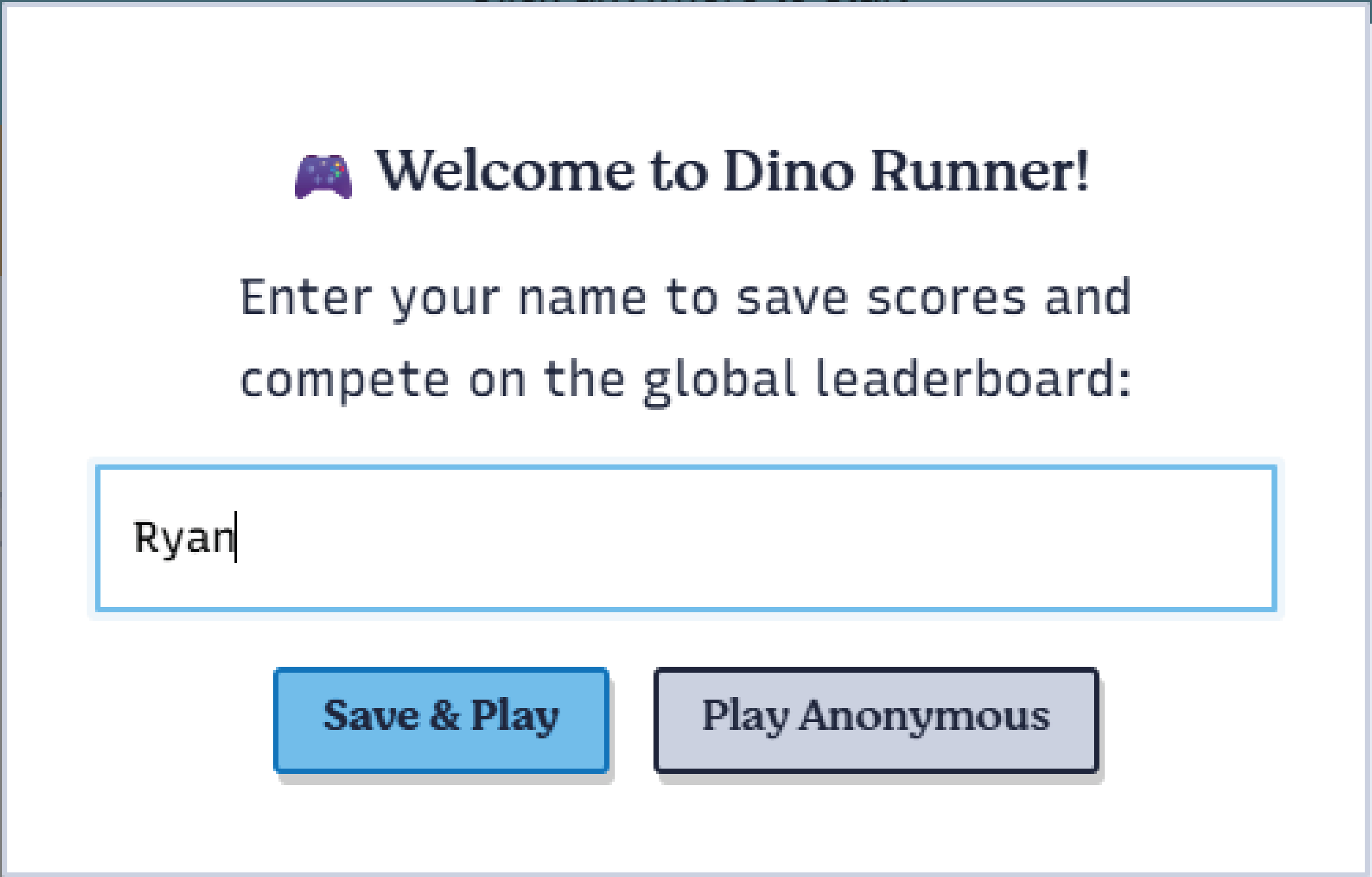
- A player-name modal that appears the first time someone loads the page.
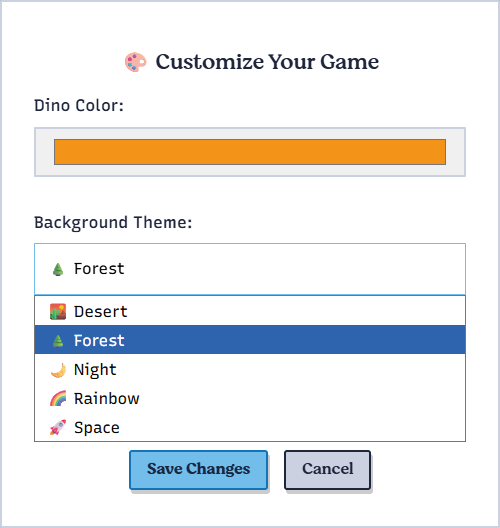
- A customization modal that exposes color, theme, and difficulty controls.
<section class="container canvas-container">
<canvas id="gameCanvas" width="800" height="220"></canvas>
<div class="game-ui">
<div class="score">Score: <span id="score">0</span></div>
<div class="high-score">High Score: <span id="highScore">0</span></div>
<div class="btn btn-primary" id="gameStatus">Click to Start!</div>
</div>
<button onclick="openCustomization()" class="btn btn-primary btn-block">
Customize Game
</button>
</section>
<!-- Player Name Modal -->
<div class="modal" id="playerModal">
<div class="modal-content">
<h3>🎮 Welcome to Dino Runner!</h3>
<p>Enter your name to save scores and compete on the global leaderboard:</p>
<input
type="text"
id="playerNameInput"
placeholder="Your name"
maxlength="20"
/>
<div class="modal-buttons">
<button onclick="savePlayerName()" class="btn btn-primary">
Save & Play
</button>
<button onclick='closeModal("playerModal")' class="btn btn-secondary">
Play Anonymous
</button>
</div>
</div>
</div>
<!-- Customization Modal -->
<div class="modal" id="customizationModal">
<div class="modal-content">
<h3>🎨 Customize Your Game</h3>
<div class="customization-options">
<div class="option-group">
<label for="dinoColorPicker">Dino Color:</label>
<input type="color" id="dinoColorPicker" value="#4CAF50" />
</div>
<div class="option-group">
<label for="backgroundTheme">Background Theme:</label>
<select id="backgroundTheme">
<option value="desert">🏜️ Desert</option>
<option value="forest">🌲 Forest</option>
<option value="night">🌙 Night</option>
<option value="rainbow">🌈 Rainbow</option>
<option value="space">🚀 Space</option>
</select>
</div>
<div class="option-group">
<label for="difficultyPreference">Difficulty:</label>
<select id="difficultyPreference">
<option value="easy">😊 Easy</option>
<option value="normal">😐 Normal</option>
<option value="hard">😈 Hard</option>
</select>
</div>
</div>
<div class="modal-buttons">
<button onclick="saveCustomization()" class="btn btn-primary">
Save Changes
</button>
<button
onclick='closeModal("customizationModal")'
class="btn btn-secondary"
>
Cancel
</button>
</div>
</div>
</div>The modal triggers call helper functions we’ll add in game.js so there’s no
framework dependency—plain DOM APIs keep things deploy-friendly.
2. Style the modal surfaces
Layer in the modal utility classes inside
public/css/styles.css. They reuse the existing btn
palette from earlier stages, so everything feels cohesive.
.modal {
  display: none;
  position: fixed;
  top: 0;
  left: 0;
  width: 100%;
  height: 100%;
  background: rgba(0, 0, 0, 0.5);
  z-index: 1000;
  animation: fadeIn 0.3s ease;
}

.modal.show {
  display: flex;
  justify-content: center;
  align-items: center;
}

.modal-content {
  background: white;
  border: 2px solid var(--secondary);
  padding: 2rem;
  max-width: 500px;
  width: 90%;
  box-shadow: 4px 8px 0px 0px var(--tertiary);
  animation: slideIn 0.3s ease;
}

.customization-options {
  margin-bottom: 1.5rem;
}

.option-group label {
  display: block;
  margin-bottom: 0.5rem;
  font-weight: 500;
}

.option-group select,
.option-group input[type="color"] {
  width: 100%;
  padding: 0.75rem;
  border: 1px solid var(--secondary);
}
Feel free to tweak the palette! The logic we’ll add next pulls the chosen colors right into the canvas background and dino sprite.
3. Teach game.js to orchestrate settings
With the UI in place we can extend the DinoGame class inside
public/js/game.js,
the key additions are:
- tracked
playerName,settings, and theme definitions. - lifecycle methods (
showPlayerNamePrompt,loadPlayerSettings,applyCustomizations,savePlayerSettings). - global helpers (
openModal,closeModal,saveCustomization, etc.) so the HTML buttons can talk to the class without bundlers.
Constructor upgrades
class DinoGame {
  constructor() {
    this.canvas = document.getElementById("gameCanvas");
    this.ctx = this.canvas.getContext("2d");
    this.scoreElement = document.getElementById("score");
    this.statusElement = document.getElementById("gameStatus");
    this.highScoreElement = document.getElementById("highScore");

    this.playerName = localStorage.getItem("playerName") || null;
    this.settings = {
      dinoColor: "#4CAF50",
      backgroundTheme: "desert",
      soundEnabled: true,
      difficultyPreference: "normal",
    };

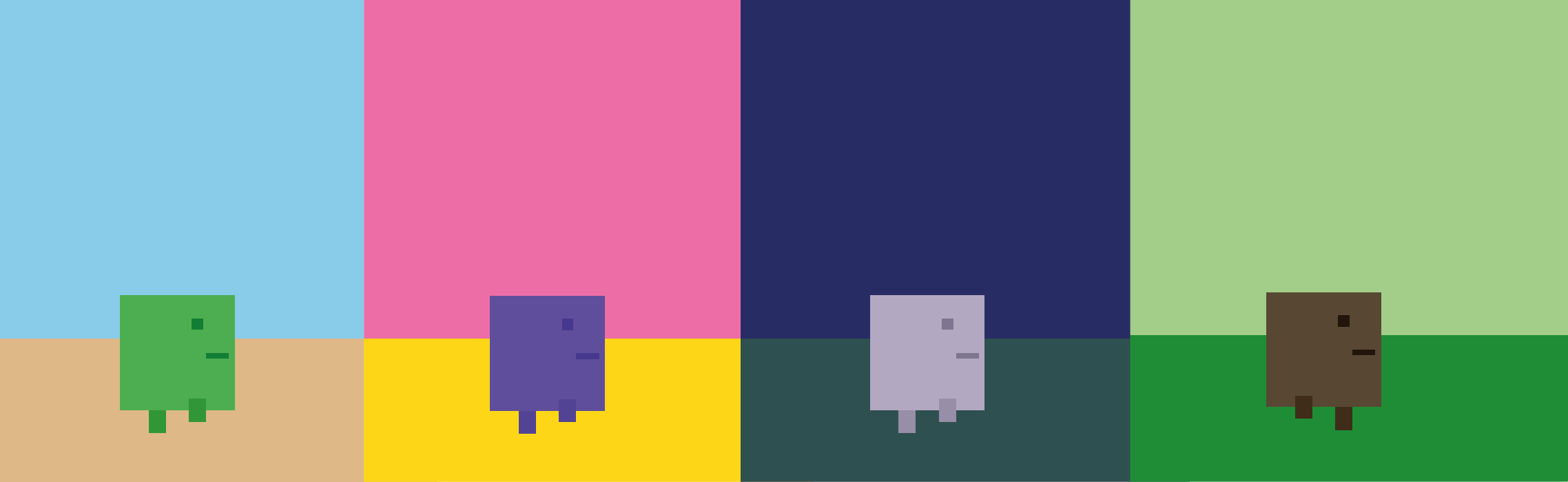
    this.themes = {
      desert: { sky: "#87CEEB", ground: "#DEB887" },
      forest: { sky: "#98FB98", ground: "#228B22" },
      night: { sky: "#191970", ground: "#2F4F4F" },
      rainbow: { sky: "#FF69B4", ground: "#FFD700" },
      space: { sky: "#000000", ground: "#696969" },
    };

    this.init();
  }
Prompt for a player name
showPlayerNamePrompt() looks for saved state; if none is found it opens the
modal and focuses the input.
showPlayerNamePrompt() {
  if (!this.playerName || this.playerName === "" || this.playerName === "null") {
    setTimeout(() => {
      const modal = document.getElementById("playerModal");
      if (modal) {
        window.openModal("playerModal");
        const input = document.getElementById("playerNameInput");
        if (input) {
          input.focus();
          input.addEventListener("keypress", this.handlePlayerNameEnter);
        }
      }
    }, 1000);
  }
}
Load, apply, and save settings
Once a player name exists we look up settings on the server, fall back to
localStorage, and immediately apply the palette + difficulty multipliers.
async loadPlayerSettings() {
  try {
    if (this.playerName) {
      const response = await fetch(`/api/customization/${this.playerName}`);
      if (response.ok) {
        const data = await response.json();
        this.settings = data.settings;
        this.applyCustomizations();
      }
    } else {
      const savedSettings = localStorage.getItem("gameSettings");
      if (savedSettings) {
        this.settings = { ...this.settings, ...JSON.parse(savedSettings) };
        this.applyCustomizations();
      }
    }
  } catch (error) {
    console.log("Using default settings:", error);
  }
}

applyCustomizations() {
  const theme = this.themes[this.settings.backgroundTheme] || this.themes.desert;
  this.canvas.style.background = `linear-gradient(to bottom, ${theme.sky} 0%, ${theme.sky} 75%, ${theme.ground} 75%, ${theme.ground} 100%)`;

  const multipliers = { easy: 0.8, normal: 1.0, hard: 1.3 };
  this.initialGameSpeed = 3 * (multipliers[this.settings.difficultyPreference] || 1.0);
  this.gameSpeed = this.initialGameSpeed;

  console.log(`🎨 Applied theme: ${this.settings.backgroundTheme}, difficulty: ${this.settings.difficultyPreference}`);
}

async savePlayerSettings() {
  if (this.playerName) {
    await fetch("/api/customization", {
      method: "POST",
      headers: { "Content-Type": "application/json" },
      body: JSON.stringify({ playerName: this.playerName, ...this.settings }),
    });
  } else {
    localStorage.setItem("gameSettings", JSON.stringify(this.settings));
  }
}
Global helpers for the modals
Instead of wiring everything through class instances, game.js exposes a few
functions on window. They open/close modals, persist names, and populate the
customization controls.
window.openModal = function (modalId) {
  const modal = document.getElementById(modalId);
  if (modal) {
    modal.classList.add("show");
    modal.style.display = "flex";
  }
};

window.saveCustomization = function () {
  const colorPicker = document.getElementById("dinoColorPicker");
  const themeSelect = document.getElementById("backgroundTheme");
  const difficultySelect = document.getElementById("difficultyPreference");

  if (window.dinoGame) {
    window.dinoGame.settings = {
      ...window.dinoGame.settings,
      dinoColor: colorPicker?.value || window.dinoGame.settings.dinoColor,
      backgroundTheme: themeSelect?.value ||
        window.dinoGame.settings.backgroundTheme,
      difficultyPreference: difficultySelect?.value ||
        window.dinoGame.settings.difficultyPreference,
    };

    window.dinoGame.applyCustomizations();
    window.dinoGame.savePlayerSettings();
  }

  window.closeModal("customizationModal");
};
Hook everything up inside window.addEventListener("load", ...) so the health
check runs, the DinoGame instance is created, and your modals are ready the
moment the DOM finishes loading.
4. Persist player choices in PostgreSQL
Stage 4 already introduced a database connection pool, migrations runner, and a
high_scores table. To store customization data we add players and
player_settings tables to
src/database/schema.sql:
CREATE TABLE IF NOT EXISTS players (
  id SERIAL PRIMARY KEY,
  username VARCHAR(50) UNIQUE NOT NULL,
  email VARCHAR(100) UNIQUE,
  avatar_url TEXT,
  created_at TIMESTAMP DEFAULT NOW(),
  updated_at TIMESTAMP DEFAULT NOW()
);

CREATE TABLE IF NOT EXISTS player_settings (
  id SERIAL PRIMARY KEY,
  player_id INTEGER REFERENCES players(id) ON DELETE CASCADE,
  dino_color VARCHAR(7) DEFAULT '#4CAF50',
  background_theme VARCHAR(20) DEFAULT 'desert',
  sound_enabled BOOLEAN DEFAULT true,
  difficulty_preference VARCHAR(20) DEFAULT 'normal',
  updated_at TIMESTAMP DEFAULT NOW(),
  UNIQUE(player_id)
);
high_scores still stores anonymous runs (player_name), but if someone has a
registered player_id we can connect their customization + leaderboard data in
one query.
5. Expose /api/customization routes
All API logic lives in
src/routes/customization.routes.ts. We
reuse the ctx.state.db pool set by middleware, so every handler can grab a
client from the pool, execute queries, and release connections.
import { Router } from "@oak/oak";

const router = new Router();

router.get("/api/customization/:playerName", async (ctx) => {
  const pool = ctx.state.db;
  const playerName = ctx.params.playerName;
  let settings = {
    dinoColor: "#4CAF50",
    backgroundTheme: "desert",
    soundEnabled: true,
    difficultyPreference: "normal",
  };

  const client = await pool.connect();
  try {
    const playerResult = await client.query(
      `SELECT id FROM players WHERE username = $1`,
      [playerName],
    );

    if (playerResult.rows.length > 0) {
      const playerId = Number(playerResult.rows[0].id);
      const settingsResult = await client.query(
        `SELECT dino_color, background_theme, sound_enabled, difficulty_preference
         FROM player_settings WHERE player_id = $1`,
        [playerId],
      );

      if (settingsResult.rows.length > 0) {
        const row = settingsResult.rows[0];
        settings = {
          dinoColor: row.dino_color,
          backgroundTheme: row.background_theme,
          soundEnabled: row.sound_enabled,
          difficultyPreference: row.difficulty_preference,
        };
      }
    }
  } finally {
    client.release();
  }

  ctx.response.body = { success: true, playerName, settings };
});

router.post("/api/customization", async (ctx) => {
  const pool = ctx.state.db;
  const body = await ctx.request.body.json();
  const {
    playerName,
    dinoColor,
    backgroundTheme,
    soundEnabled,
    difficultyPreference,
  } = body;

  const client = await pool.connect();
  try {
    const playerResult = await client.query(
      `INSERT INTO players (username) VALUES ($1)
       ON CONFLICT (username) DO UPDATE SET updated_at = NOW()
       RETURNING id`,
      [playerName],
    );

    const playerId = Number(playerResult.rows[0].id);

    await client.query(
      `INSERT INTO player_settings (player_id, dino_color, background_theme, sound_enabled, difficulty_preference)
       VALUES ($1, $2, $3, $4, $5)
       ON CONFLICT (player_id) DO UPDATE SET
         dino_color = $2,
         background_theme = $3,
         sound_enabled = $4,
         difficulty_preference = $5,
         updated_at = NOW()`,
      [
        playerId,
        dinoColor,
        backgroundTheme,
        soundEnabled,
        difficultyPreference,
      ],
    );
  } finally {
    client.release();
  }

  ctx.response.body = {
    success: true,
    message: "Customization settings saved successfully",
  };
});

export { router as customizationRoutes };
There’s also a simple /api/customization/options handler that returns
available themes, colors, and difficulty presets for future UI work.
6. Serve everything with Oak
The rest of the backend is Oak boilerplate. src/middleware/database.ts attaches the pool to every request. src/main.ts initializes the schema, registers middleware, and mounts the routers before falling back to the static file server:
import { Application } from "@oak/oak/application";
import { apiRouter } from "./routes/api.routes.ts";
import { leaderboardRoutes } from "./routes/leaderboard.routes.ts";
import { customizationRoutes } from "./routes/customization.routes.ts";
import { databaseMiddleware } from "./middleware/database.ts";
import { initializeDatabase } from "./database/migrations.ts";

await initializeDatabase();

const app = new Application();
app.use(databaseMiddleware);

app.use(async (context, next) => {
  try {
    if (context.request.url.pathname === "/leaderboard") {
      await context.send({
        root: `${Deno.cwd()}/public`,
        path: "leaderboard.html",
      });
      return;
    }

    await context.send({ root: `${Deno.cwd()}/public`, index: "index.html" });
  } catch {
    await next();
  }
});

app.use(apiRouter.routes());
app.use(leaderboardRoutes.routes());
app.use(customizationRoutes.routes());

app.listen({ port: PORT });
With those pieces in place the leaderboard API, customization API, and static
assets all share a single Deploy project (or run locally via deno task dev).
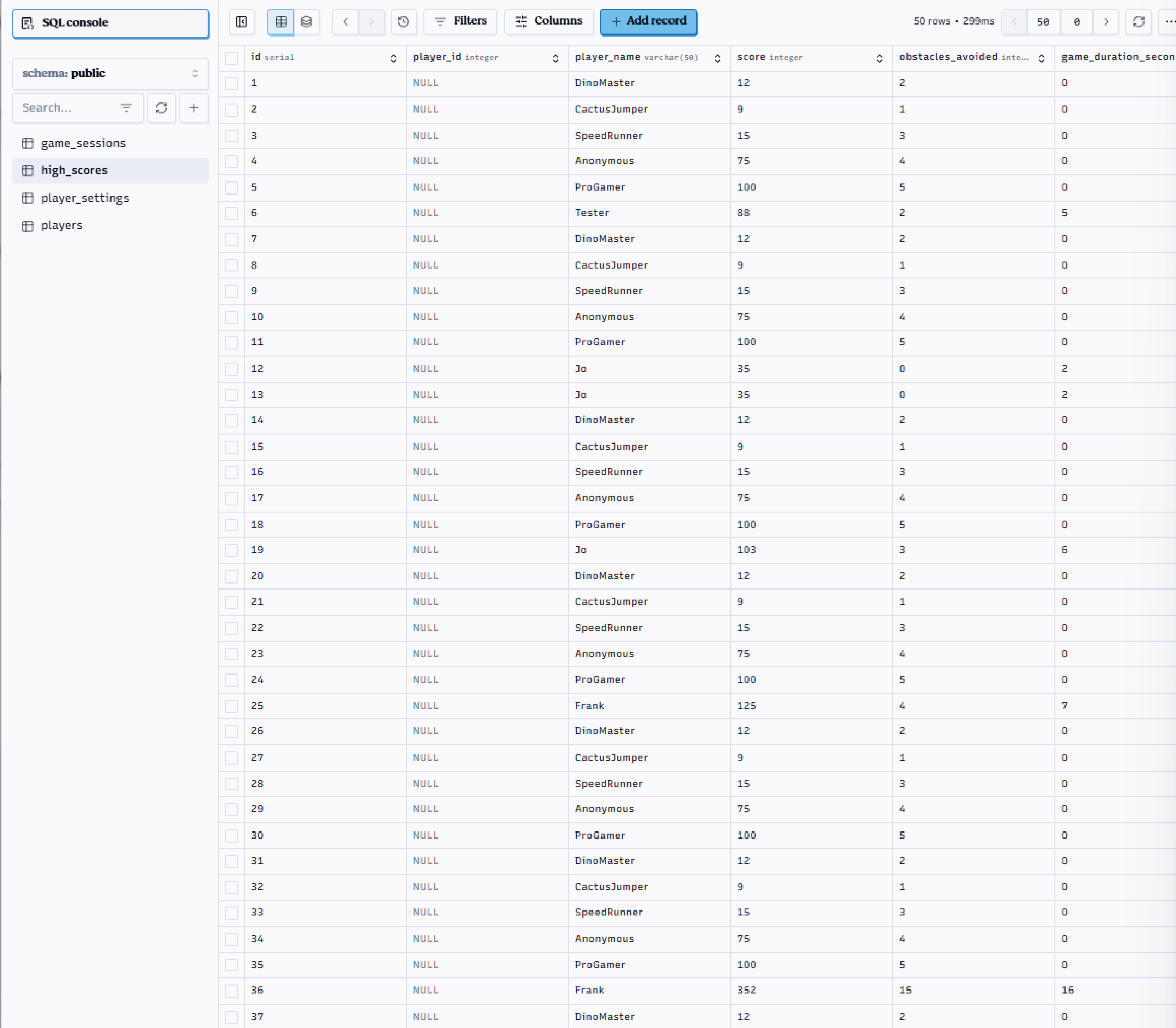
7. Exploring your databases with Deno Deploy
You can view and edit your PostgreSQL databases directly from the Deno Deploy
dashboard. This is especially useful for inspecting the players,
player_settings, and high_scores tables as you test your game. To access the
database:
- Go to your Deno Deploy project dashboard and log in.
- Click on the “Apps” tab and select your game project.
- Navigate to the “Databases” section in the sidebar. Here you can see a list of your databases, a production database, a preview database and a database you can use for local testing.
- Click the Explore button on the database you want to explore (e.g., the production database).
- From here you can search and edit your tables to inspect player data, scores, and settings.
8. Validate the full loop
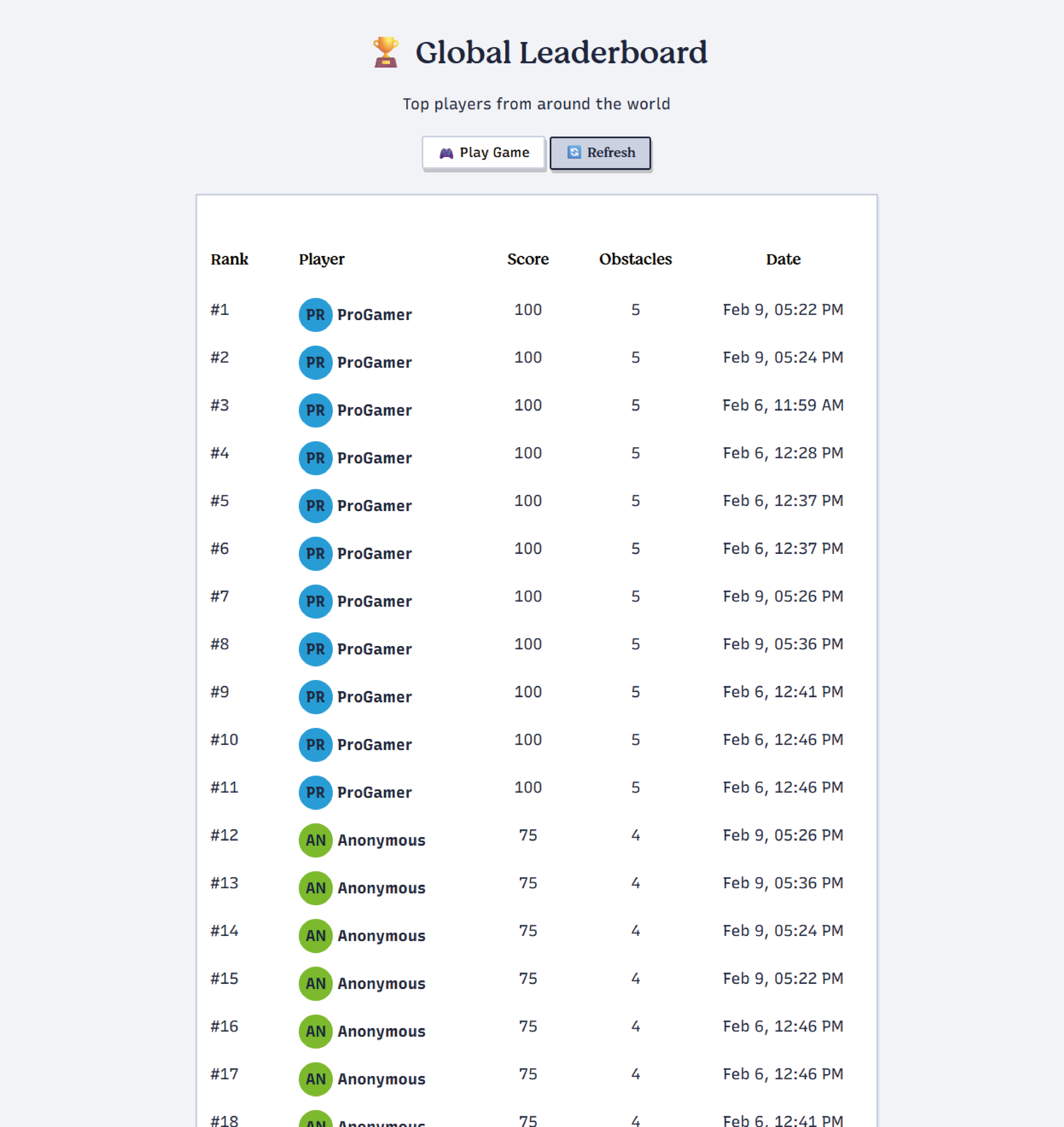
At this point you should have a fully functional game with player identities, customizable themes, and persistent preferences. To validate everything is wired up correctly:
- Run
deno task dev(ordeno run --allow-net --allow-read --allow-env --env-file src/main.ts) insidegame-tutorial-stage-4. - Open localhost and enter a name when prompted.
- Customize the color/theme/difficulty, then start a run. When you crash the
game, the POST
/api/scoreshandler records the attempt, while POST/api/customizationpersists your palette. - Visit
/leaderboard(served via public/leaderboard.html) and watch public/js/leaderboard.js call/api/leaderboard?limit=50every 30 seconds. - Reload the main page—your dino should immediately apply the stored palette and
speed multiplier fetched from
/api/customization/:playerName.
You can explore the full reference implementation and Deploy link here: https://game-tutorial-stage-4.thisisjofrank.deno.net/
Stage 5 accomplishments
- ✅ Player-name prompt and customization modal wired directly into the game UI.
- ✅ Responsive modal styles that reuse the existing Stage 2–4 design system.
- ✅
game.jssettings lifecycle: fetch, apply, persist, and rehydrate themes plus difficulty multipliers. - ✅ PostgreSQL schema + Oak routes that store both scores and preferences.
- ✅ Leaderboard page that reflects personalized player identities in real time.
What’s next?
Stage 6 will concentrate on observability—metrics, logging, and alerting—so you can understand how players behave at scale. We’ll wire up structured logs, shipping analytics events, and dashboards that track leaderboard health and customization adoption. For now, enjoy the custom player experience you just delivered! 🦕✨
What else are you building with Deno? Let us know on Twitter, Bluesky, or Discord.